In Part 1 of this series, I built a RAG pipeline that made 500 arXiv research papers searchable in plain English. The setup was straightforward: a Python script ingesting papers into PostgreSQL with the pgvector extension, a Claude-powered query endpoint, and a Streamlit UI — all running on a local machine. It worked well. But it also raised a question I couldn't stop thinking about.
What if the same pipeline ran entirely serverless, on any major cloud?
That question became this project: a monorepo that deploys the same RAG system — same arXiv data, same chunking logic, same query interface — on AWS, Azure, and GCP using only each cloud's native AI services, with Terraform handling all the infrastructure.
A Quick Recap: How RAG Works
If you haven't read Part 1, here's the essential idea in two steps.
Ingest (done once per document batch): Take a document → split it into overlapping 512-token chunks → convert each chunk into a vector (a list of numbers encoding its meaning) using an embedding model → store the vector alongside the text in a vector database.
Query (done every time a user asks a question): Convert the question into a vector using the same embedding model → find the top-5 chunks whose vectors are closest to the question → send those chunks as context to a language model → return the answer.
The key insight is that vector similarity equals semantic similarity. "Efficient transformer training" and "reducing compute for LLMs" produce similar vectors even though they share no words. That's what makes this better than keyword search.
Part 1 wrapped all of this in a local Streamlit app — a simple chat interface where you type a question and get a cited answer drawn from the paper collection. It ran on your machine, talked to a local PostgreSQL database, and used all-MiniLM-L6-v2 from Hugging Face for embeddings and claude-sonnet-4-6 via the Anthropic API for generation. Useful, but tied to a single machine and a single set of model providers.
What Changes Going Serverless and Cloud-Native
Running locally gives you control but costs you simplicity. The serverless version makes a different set of trade-offs:
| Local machine | Serverless cloud |
|---|---|
| PostgreSQL + pgvector (always running) | Managed vector store (scales to zero or pay-per-op) |
| Query endpoint on localhost only | Cloud function behind a public HTTPS endpoint |
| Streamlit running locally, not publicly accessible | Streamlit on Hugging Face Spaces — accessible from anywhere |
all-MiniLM-L6-v2 for embeddings, claude-sonnet-4-6 for generation |
Each cloud uses only its own AI platform |
Manual python ingest.py to update data |
Scheduled batch job triggered automatically |
| Local scripts + Docker Compose to spin up the app and a local PostgreSQL DB | terraform apply provisions all cloud resources — functions, vector store, scheduler, IAM |
Cloud Service Selection Criteria
Every cloud service in this project was chosen against three hard criteria:
-
Fully managed (SaaS) — no servers to provision or maintain. No EC2 instances, no VMs, no Kubernetes clusters. The cloud provider handles all underlying infrastructure. If a service requires you to configure node counts, shard sizes, or container registries just to get started, it was ruled out.
-
Scale to zero when idle. Every component shuts down when not in use and spins back up on demand. You pay only for what you actually run — not for a cluster sitting idle at 2AM waiting for the next query. This is the economic argument for serverless: a portfolio project that gets ten queries a day should not cost the same as a production system handling thousands.
-
Easy to tear down and recreate.
terraform destroyremoves everything.terraform applybrings it back. No manual cleanup steps, no orphaned resources, no lingering costs after a demo. This also makes the project safe to experiment with — spin it up, test it, tear it down.
Services that failed any of these criteria were replaced. Azure Data Factory was dropped because its Integration Runtime is always-on. Vertex AI Vector Search was dropped because its index nodes run continuously. Dataflow was dropped because its startup overhead made it impractical for the workload. The services that made the cut map directly onto the local components they replace:
| Local component | AWS | Azure | GCP |
|---|---|---|---|
| Python ingest script | AWS Glue Python Shell | Azure ML Job | Vertex AI Custom Training |
| PostgreSQL + pgvector | OpenSearch Serverless | Azure AI Search | Firestore |
| Query endpoint on localhost | Lambda + API Gateway | Azure Functions | Cloud Functions 2nd gen |
all-MiniLM-L6-v2 (HF embedding model) | Bedrock Titan Embeddings V2 | AI Foundry text-embedding-3-large | Vertex AI text-embedding-004 |
| Anthropic Claude API (generation) | Bedrock Amazon Nova Pro | AI Foundry GPT-4o | Vertex AI Gemini 2.5 Flash |
| Streamlit on local machine | Hugging Face Spaces (shared across all clouds) | ||
The biggest conceptual shift is the design principle this project enforces: each cloud is a self-contained deployment that uses only that cloud's own AI services. AWS uses Amazon Bedrock. Azure uses Azure AI Foundry. GCP uses Vertex AI. No mixing. This reflects how real enterprise deployments work — teams don't want GCP workloads routing through Bedrock — and it forces you to genuinely learn each platform rather than reusing the same API key everywhere.
The Adapter Pattern — One Query Handler, Three Clouds
The adapter pattern applies specifically to the query path. Each ingest job (Glue, Azure ML, Vertex AI Custom Training) is a cloud-specific script that runs in an isolated managed environment. The adapter pattern — the Embedder, Retriever, and Generator ABCs — is not used by ingest jobs; each job calls cloud SDKs directly. (The Glue job is fully self-contained; the Azure ML and GCP jobs may share lightweight utilities like core/chunker.py, but not the interface layer.) The query handler is a different story: Lambda, Azure Functions, and Cloud Functions all do the same three steps (embed → search → generate), and without a shared design they would be three near-identical copies diverging over time.
core/interfaces.py defines three abstract base classes — Embedder, Retriever, and Generator — each specifying a contract: any class that implements it must provide these methods. Every cloud supplies its own concrete implementation:
BedrockEmbedder        (AWS)   ─┐
AzureFoundryEmbedder   (Azure) ─┤── all implement Embedder
VertexEmbedder         (GCP)   ─┘
The query handler never imports boto3, azure, or google.cloud. It only calls embedder.embed(), retriever.search(), and generator.generate() — and at runtime the right implementation is injected via environment variables. Three clouds, one handler, zero if statements.
AWS: Bedrock + OpenSearch Serverless + Glue
The AWS stack maps naturally onto serverless equivalents for every component.
Ingest path
flowchart LR
    A["arXiv API\ncs.AI · cs.LG · cs.CL"]
    B["EventBridge Scheduler\ndaily 02:00 UTC"]
    C["AWS Glue\nPython Shell"]
    D["Amazon Bedrock\nTitan Embeddings V2\n1,024-dim per chunk"]
    E[("OpenSearch\nServerless\nHNSW KNN")]

    B -->|1. trigger| C
    C -->|2. fetch papers| A
    A -->|3. abstracts| C
    C -->|4. embed chunks| D
    D -->|5. vectors| C
    C -->|6. upsert| E

    style A fill:#f1f5f9,stroke:#94a3b8,color:#334155
    style B fill:#b91c1c,stroke:#991b1b,color:#fff
    style C fill:#7c3aed,stroke:#6d28d9,color:#fff
    style D fill:#1e293b,stroke:#FF9900,color:#FF9900
    style E fill:#0369a1,stroke:#075985,color:#fff
Query path
flowchart LR
    F["HF Spaces\nStreamlit UI"]
    G["API Gateway\nHTTPS endpoint"]
    H["AWS Lambda\nPython 3.12 arm64"]
    I["Amazon Bedrock\nTitan V2\n1024-dim query vector"]
    J[("OpenSearch\nServerless\nvector search")]
    K["Amazon Bedrock\nNova Pro\ngenerate answer"]

    F -->|1. question| G -->|2. forward| H
    H -->|3. embed question| I
    I -->|4. 1024-dim vector| H
    H -->|5. KNN search| J
    J -->|6. top-5 chunks| H
    H -->|7. question + chunks| K
    K -->|8. answer text| H
    H -->|9. HTTP response| G
    G -->|10. answer| F

    style F fill:#FFD21E,stroke:#b45309,color:#333
    style G fill:#b91c1c,stroke:#991b1b,color:#fff
    style H fill:#FF9900,stroke:#d97706,color:#1e293b
    style I fill:#1e293b,stroke:#FF9900,color:#FF9900
    style J fill:#0369a1,stroke:#075985,color:#fff
    style K fill:#1e293b,stroke:#FF9900,color:#FF9900
Ingestion: AWS Glue Python Shell
The ingest job fetches arXiv papers daily and embeds them. Locally you'd just run a Python script. On AWS the natural answer seems like Lambda — but Lambda has a hard 15-minute execution limit, and embedding 500 papers serially via Titan V2 takes around 20 minutes. Lambda would time out before finishing.
AWS Glue Python Shell solves this cleanly. It runs a single Python script on a small managed server (max_capacity = 0.0625 DPU — the smallest available), with a 48-hour max runtime and dependencies installed automatically from PyPI at execution time. No zip file to maintain, no container to build. An EventBridge Scheduler triggers it daily at 2AM UTC. Re-running is safe — before indexing each chunk the job queries OpenSearch for an existing document with the same arxiv_id and chunk_index, and skips it if found. No duplicates are created.
One Terraform note worth flagging: the Glue IAM role is defined at the root main.tf, not inside the modules/glue/ module. The reason is circular: the Glue module needs the role ARN for inline policies, and the OpenSearch module also needs the same role ARN for its data access policy. Placing the role inside either module creates a Terraform module-level cycle. Lifting it to root lets both modules reference it as a plain resource, and the cycle disappears.
Embedding and Generation: Amazon Bedrock
Bedrock is the natural choice for both models because it is AWS's managed multi-model AI platform — the same IAM credentials the Lambda and Glue already use cover every Bedrock call. No separate API keys, no extra secrets to rotate.
Embedding: Titan Embeddings V2 (amazon.titan-embed-text-v2:0), producing 1024-dimensional vectors. Titan V2 was chosen over Cohere Embed v3 (also available on Bedrock) to stay with Amazon's own models, consistent with the cloud-native principle. The downside: Titan has no batch endpoint, so embed_batch() calls the API once per chunk. That serial nature is exactly why Glue (not Lambda) handles ingestion. Importantly, Lambda also calls Titan V2 at query time to embed the question — using the same model for both ingest and query is what makes the KNN match meaningful: stored vectors and query vectors live in the same embedding space.
Generation: Amazon Nova Pro via the Bedrock Converse API. Claude models on Bedrock require submitting a use-case form and waiting for approval — a friction point for a fresh deployment. Nova Pro activates automatically on first invocation, costs ~$0.80/$3.20 per million input/output tokens (substantially cheaper than Claude Sonnet), and is Amazon's own model rather than a third-party. The Converse API uses a unified message format across all AWS-native models, so swapping to Nova Lite or any future Amazon model is a one-line change in variables.tf.
Vector Store: AWS OpenSearch Serverless (AOSS)
The two main alternatives were self-managed OpenSearch on EC2 and Elasticsearch. Self-managed OpenSearch means provisioning and maintaining cluster nodes — the opposite of serverless. Elasticsearch was ruled out on licensing grounds: in 2021 Elastic changed its licence from Apache 2.0 to the proprietary SSPL, which is why AWS forked the last open-source version (7.10) as OpenSearch. AOSS, the serverless variant, is the only option that eliminates cluster management entirely on AWS.
AOSS scales the underlying cluster automatically without you configuring shard counts or node sizes. It supports HNSW indexing for fast approximate KNN search. Authentication uses SigV4 request signing — the Lambda's existing IAM role is the only credential needed, with no extra secrets to manage. Three Terraform policies are required (encryption, network, and data access), and the data access policy explicitly names the Lambda role ARN as an allowed principal.
I'll admit there's a personal reason I enjoyed working with AOSS: I've spent years working with the ELK stack (Elasticsearch, Logstash, Kibana) in previous roles, so the query DSL and index concepts felt immediately familiar. Getting to use a serverless, fully managed descendant of that same technology — without touching a single cluster config — felt like a natural upgrade.
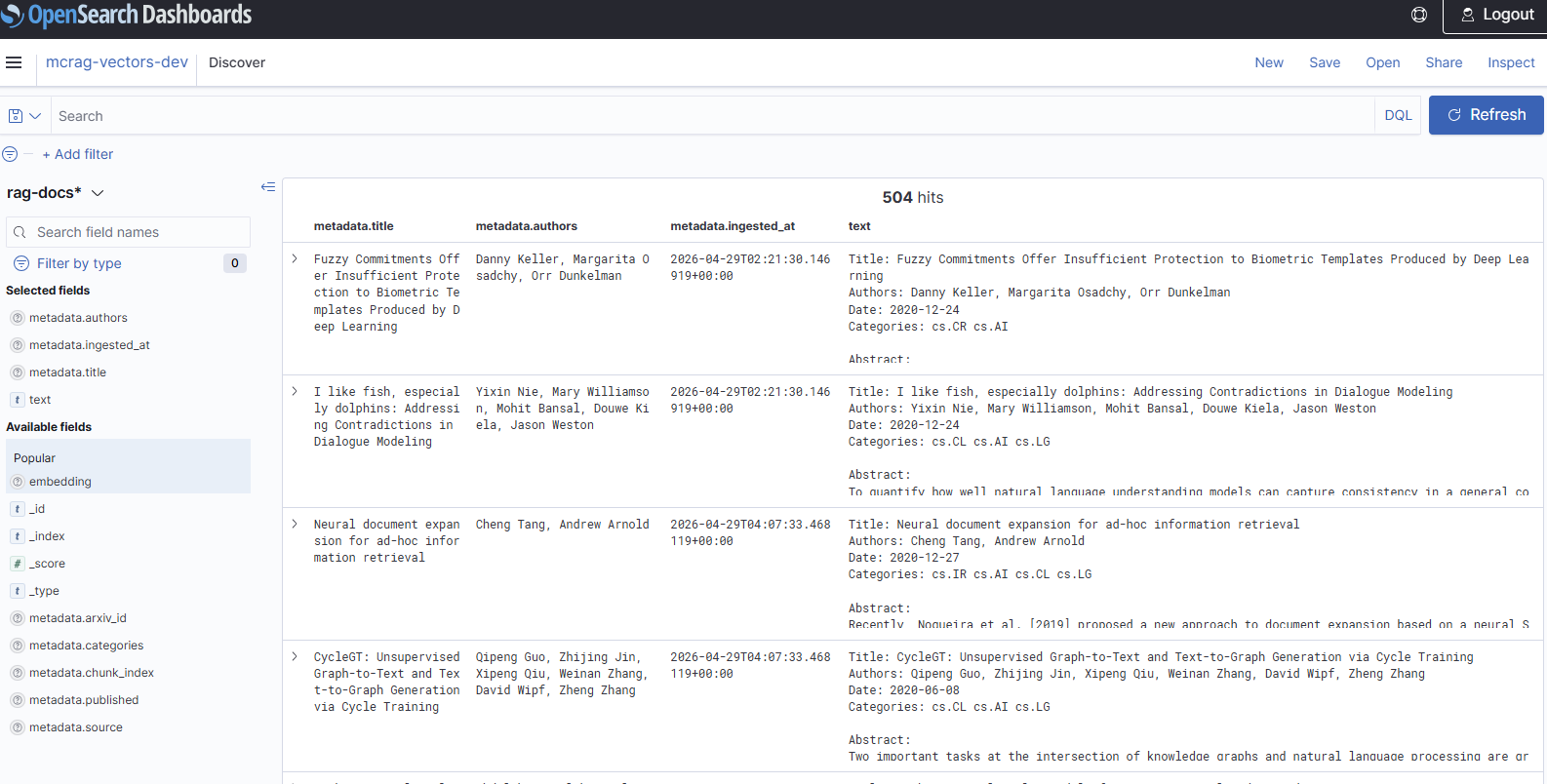 OpenSearch Serverless Discover view — the
 rag-docs index after ingestion, showing 504 paper chunks with title, authors, abstract and metadata fields.
Query Endpoint: Lambda + API Gateway
Lambda is the right fit for the query path — it is a single request-response handler that runs for a few seconds then terminates. ECS Fargate would also work but requires a container image, a VPC, and a load balancer: meaningful overhead for what is essentially a small Python function. Lambda needs none of that.
The query Lambda runs on Python 3.12, arm64 architecture (cheaper and faster than x86 for Python workloads), with a 30-second timeout. API Gateway sits in front with an API key requirement (x-api-key header) and a usage plan capped at 1,000 requests per day — enough for a portfolio demo without the risk of a surprise bill.
Azure: AI Foundry + AI Search + Azure ML
The Azure stack follows the same shape — one batch job for ingestion, one managed vector store, one function for queries — but each component has its own Azure-flavoured equivalent.
Ingest path
flowchart LR
    A["arXiv API\ncs.AI · cs.LG · cs.CL"]
    B["Azure ML Schedule\ndaily 02:00 UTC"]
    C["Azure ML Job\nPython script · min=0 nodes"]
    D["Azure AI Foundry\ntext-embedding-3-large\n3,072-dim per batch"]
    E[("Azure AI Search\nBasic tier\nHNSW index")]

    B -->|1. trigger| C
    C -->|2. fetch papers| A
    A -->|3. abstracts| C
    C -->|4. embed chunks| D
    D -->|5. vectors| C
    C -->|6. upload_documents| E

    style A fill:#f1f5f9,stroke:#94a3b8,color:#334155
    style B fill:#0078D4,stroke:#106EBE,color:#fff
    style C fill:#0078D4,stroke:#106EBE,color:#fff
    style D fill:#50E6FF,stroke:#00B4D8,color:#0e3a5a
    style E fill:#0078D4,stroke:#106EBE,color:#fff
Query path
flowchart LR
    F["HF Spaces\nStreamlit UI"]
    G["Azure Functions\nHTTP Trigger · Consumption"]
    I_EMB["Azure AI Foundry\ntext-embedding-3-large\n3072-dim query vector"]
    I[("Azure AI Search\nVectorizedQuery\ntop-5 KNN")]
    J["Azure AI Foundry\nGPT-4o\nChatCompletions"]

    F -->|1. question| G
    G -->|2. embed question| I_EMB
    I_EMB -->|3. 3072-dim vector| G
    G -->|4. KNN search| I
    I -->|5. top-5 chunks| G
    G -->|6. question + chunks| J
    J -->|7. answer text| G
    G -->|8. HTTP response| F

    style F fill:#FFD21E,stroke:#b45309,color:#333
    style G fill:#0078D4,stroke:#106EBE,color:#fff
    style I_EMB fill:#50E6FF,stroke:#00B4D8,color:#0e3a5a
    style I fill:#0078D4,stroke:#106EBE,color:#fff
    style J fill:#50E6FF,stroke:#00B4D8,color:#0e3a5a
Ingestion: Azure ML Scheduled Job
Like Glue, the Azure ingest job needs more time than a function timeout allows. Azure Data Factory (ADF) was the obvious candidate, but ADF requires a persistent Integration Runtime — you're paying ~$0.80/hour around the clock to run a 20-minute job once a day. That's wasteful.
Azure ML Scheduled Job on a compute cluster (Standard_DS2_v2, min=0 nodes, max=1) matches Glue's cost model exactly: the cluster scales to zero between runs, you pay only while the script executes. The job YAML references the same Python script that could run locally:
type: command
command: python job.py --max-results 500 --query "cs.AI OR cs.LG OR cs.CL"
compute: azureml:mcrag-ingest-cluster
One wrinkle: the azurerm Terraform provider has no resource for Azure ML schedules (they're a data-plane concern, not an ARM resource). The schedule is created post-deploy via a Python script using the azure-ai-ml SDK — the one tool in the stack that can't be fully Terraformed.
Embedding and Generation: Azure AI Foundry
Azure AI Foundry is the Azure equivalent of Amazon Bedrock: a multi-model platform hosting OpenAI models, open-source models (Llama, Phi, Mistral), and Microsoft's own models, all under one cognitive endpoint. Both embedding and generation use the standard OpenAI Python SDK (openai.AzureOpenAI) — the recommended client for Azure OpenAI-compatible endpoints — configured with azure_endpoint and api_version pointing at the AI Foundry resource.
Embedding: text-embedding-3-large, producing 3072-dimensional vectors — three times the dimensions of Titan V2. The client.embeddings.create() call accepts a list of strings, so the entire batch of chunks is sent in a single API call. More efficient than Titan's serial-only approach.
Generation: GPT-4o via client.chat.completions.create(). For a RAG use case the model mostly synthesises retrieved context — it doesn't need maximum reasoning depth. GPT-4o hits the right quality/cost balance here.
Vector Store: Azure AI Search (Basic Tier)
Azure AI Search is the native managed search service on Azure, with first-class vector search support and deep integration with AI Foundry. The two main alternatives were Elasticsearch on Azure Marketplace, which requires managing VMs, and Cosmos DB for NoSQL, which has a newer and less mature vector search implementation compared to AI Search's purpose-built HNSW indexing. AI Search is fully managed and integrates with Azure's identity stack out of the box.
The query pattern mirrors OpenSearch almost exactly: search_text=None disables keyword search, leaving pure KNN vector search via VectorizedQuery.
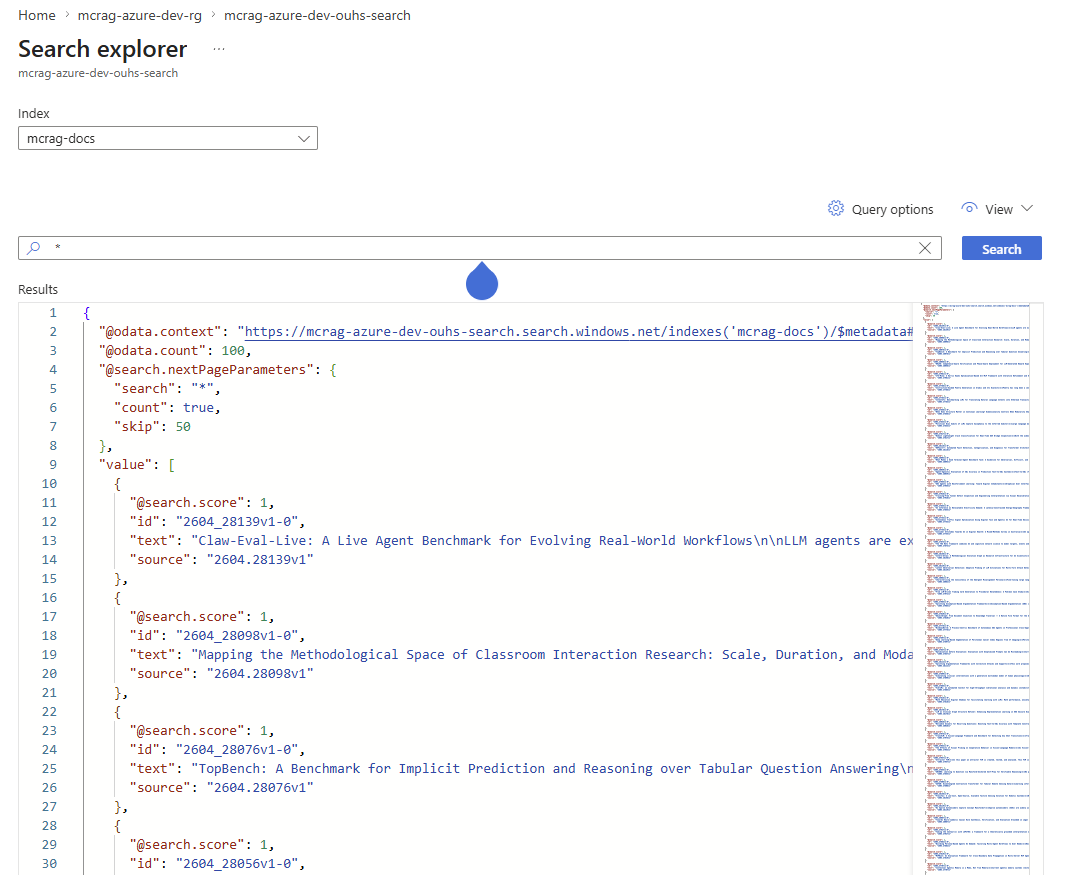 Azure AI Search Explorer — the
 mcrag-docs index after ingestion, showing paper chunks returned as JSON documents.
Query Endpoint: Azure Functions HTTP Trigger
Azure Functions on the Consumption plan is the direct Lambda equivalent and the natural choice for a simple HTTP request-response handler. Azure Container Apps and App Service were considered but are heavier options — Container Apps requires a container image and a registry, App Service has a minimum always-on cost. Functions needs neither: pure Python, a requirements.txt, and zero infrastructure to manage.
Authentication uses a function-level key injected via the x-functions-key header — no API Management layer needed for a portfolio demo. The function scales to zero between requests and is billed only for execution time.
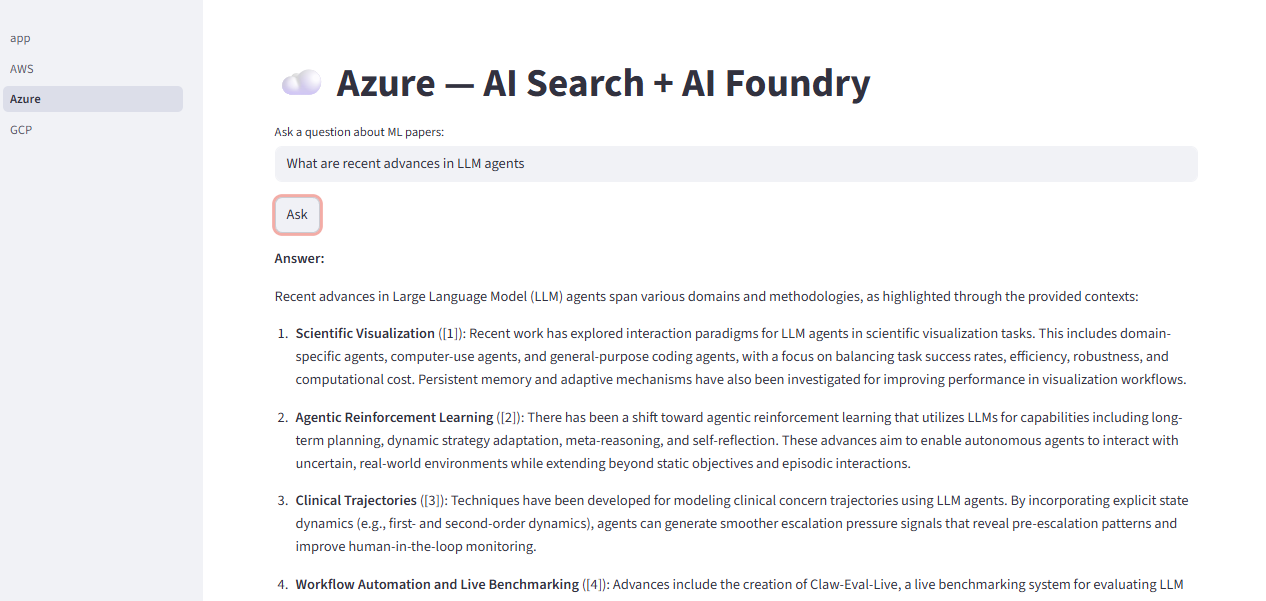 The Streamlit UI running locally against the live Azure endpoint — Azure AI Search + AI Foundry returning a cited answer about recent LLM agent research.
GCP: Vertex AI + Firestore + Cloud Functions
GCP took the most iteration to get right, largely because the obvious ingest option turned out to be a poor fit.
Ingest path
flowchart LR
    A["arXiv API\ncs.AI · cs.LG · cs.CL"]
    B["Cloud Scheduler\ndaily 02:00 UTC"]
    C["Vertex AI\nCustom Training Job\nsklearn container · 2-5 min"]
    D["Vertex AI\ntext-embedding-004\n768-dim per batch"]
    E[("Firestore\nvector index\nCOSINE")]

    B -->|1. trigger| C
    C -->|2. fetch papers| A
    A -->|3. abstracts| C
    C -->|4. embed chunks| D
    D -->|5. vectors| C
    C -->|6. doc.set Vector| E

    style A fill:#f1f5f9,stroke:#94a3b8,color:#334155
    style B fill:#4285F4,stroke:#1a73e8,color:#fff
    style C fill:#4285F4,stroke:#1a73e8,color:#fff
    style D fill:#34A853,stroke:#2d9249,color:#fff
    style E fill:#FBBC04,stroke:#d4a800,color:#333
Query path
flowchart LR
    F["HF Spaces\nStreamlit UI"]
    G["Cloud Functions 2nd gen\nPython 3.12 · 60 min"]
    I_EMB["Vertex AI\ntext-embedding-004\n768-dim query vector"]
    I[("Firestore\nfind_nearest\ntop-5 COSINE")]
    J["Vertex AI\nGemini 2.5 Flash\nGenerativeModel"]

    F -->|1. question| G
    G -->|2. embed question| I_EMB
    I_EMB -->|3. 768-dim vector| G
    G -->|4. KNN search| I
    I -->|5. top-5 chunks| G
    G -->|6. question + chunks| J
    J -->|7. answer text| G
    G -->|8. HTTP response| F

    style F fill:#FFD21E,stroke:#b45309,color:#333
    style G fill:#4285F4,stroke:#1a73e8,color:#fff
    style I_EMB fill:#34A853,stroke:#2d9249,color:#fff
    style I fill:#FBBC04,stroke:#d4a800,color:#333
    style J fill:#EA4335,stroke:#c5221f,color:#fff
Ingestion: Vertex AI Custom Training (Not Dataflow)
The first implementation used Google Cloud Dataflow with Apache Beam — the GCP equivalent of AWS Glue's distributed ETL model. After running it against GCP, the problems were immediate:
- 30–60 minute startup for every job run — VM provisioning, Docker pull, and ~800MB of Beam dependencies installing before a single record was processed.
- A
beam.Create(offsets)step triggered a GroupByKey shuffle that blocked for 50+ minutes. - Beam's
ParDo/PCollectionmodel added meaningful boilerplate for a workload that is inherently sequential — one thread fetches pages, embeds chunks, writes to Firestore.
Vertex AI Custom Training with a pre-built Google container (us-docker.pkg.dev/vertex-ai/training/sklearn-cpu.1-6) was the fix. The container is hosted in Google Artifact Registry and starts in 2–5 minutes. The ingest script is plain Python — requests + vertexai + firestore, no framework. GCP provisions a VM, runs the script, and terminates the VM when it finishes. Same cost model as Glue and Azure ML.
The submission script gcp/scripts/run_vertex_job.py mirrors azure/scripts/create_schedule.py in structure — both read Terraform outputs, package the script, and submit a managed compute job via the cloud's Python SDK.
Embedding and Generation: Vertex AI
Vertex AI is GCP's unified AI platform and the only choice that keeps the stack entirely within Google's ecosystem. Authentication uses Application Default Credentials (ADC) — the same service account that runs the Custom Training job and the Cloud Function is granted roles/aiplatform.user, so no API key is needed anywhere.
Embedding: text-embedding-004, producing 768-dimensional vectors. Chosen over the older textembedding-gecko@003 (superseded) and text-embedding-005 (less widely tested at the time). Vertex AI supports batches of up to 250 texts per call, making ingestion more efficient than Titan's serial-only approach.
Generation: Gemini 2.5 Flash. For RAG the model mostly summarises retrieved context, so raw reasoning depth matters less than latency and cost. Gemini 1.5 Pro's deeper reasoning capability would be overkill with no meaningful quality gain for this use case.
Vector Store: Firestore with find_nearest()
Vector search in Firestore reached GA in late 2024. Each document stores its embedding as a Vector field:
doc_ref.set({
    "text": chunk_text,
    "embedding": Vector(embedding_floats),
    "source": arxiv_id,
})
Querying is a single SDK call:
results = collection.find_nearest(
    vector_field="embedding",
    query_vector=Vector(query_embedding),
    distance_measure=DistanceMeasure.COSINE,
    limit=5,
)
Vertex AI Vector Search was the other candidate — purpose-built for large-scale ANN search, excellent at multi-million-document scale. But it requires always-on index nodes at ~$50–200/month. Firestore charges per read/write operation with zero idle cost, which matches the portfolio project's economics. BigQuery also offers vector search but has data-warehouse query latency (~1–3 seconds) that makes it unsuitable for interactive RAG.
Query Endpoint: Cloud Functions 2nd Gen
Cloud Run was the main alternative — more flexible, supports containers, and underlies Cloud Functions 2nd gen anyway. But for a pure-Python request handler with no container requirements, Cloud Functions is the simpler choice: deploy a folder with main.py and requirements.txt, no Dockerfile needed. Cloud Functions 2nd gen (built on Cloud Run) supports timeouts up to 60 minutes — far more than the 9-minute ceiling of 1st gen. The project configures timeout_seconds = 60 (one minute), which is more than enough for a RAG query.
It scales to zero between requests and is billed per invocation, consistent with Lambda and Azure Functions. The function is deployed as a public unauthenticated endpoint — Terraform grants allUsers the roles/cloudfunctions.invoker role, so the Streamlit client POSTs to the URL with no auth header. This differs from AWS (API Gateway API key) and Azure (function-level key). For a portfolio demo this keeps the client simple; a production deployment would add Google IAP or a Cloud Endpoints API key.
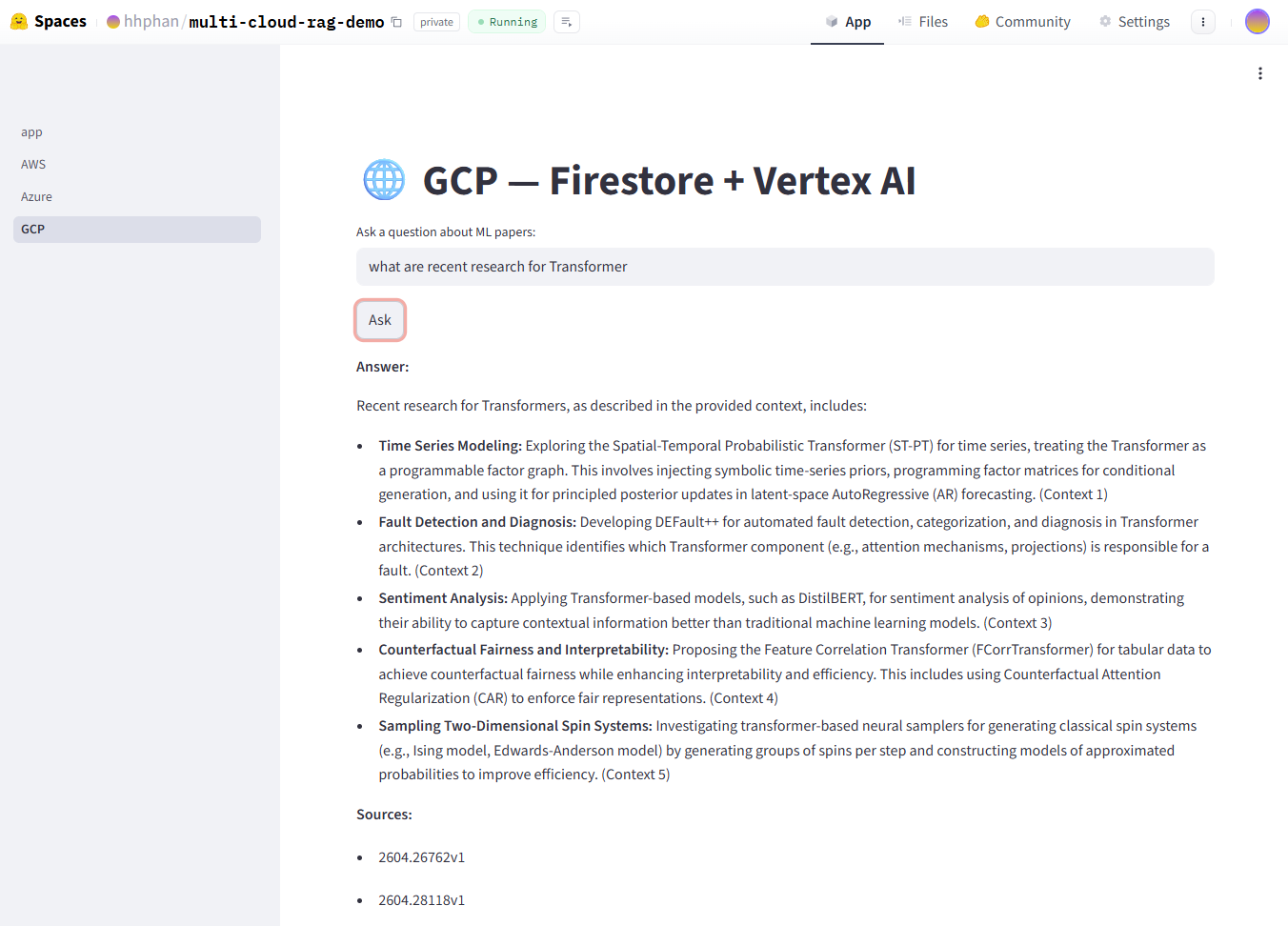 The GCP stack live on Hugging Face Spaces — Firestore + Vertex AI returning cited answers about Transformer research.
The Demo UI — Hugging Face Spaces
One of the practical wins of this project is that the local Streamlit app required almost no changes to run on Hugging Face Spaces. The app was already written as a multi-page Streamlit app — one page per cloud — so the code itself was reusable as-is. The only work was packaging it for deployment.
HF Spaces no longer offers a first-class Streamlit SDK in the new Space creation UI. Streamlit is now available under the Docker → Streamlit template, which means the Space is backed by a Dockerfile. A custom app/Dockerfile is committed to the repo, overriding the template's default so the Space runs the project's own app.py instead of the template's spiral demo.
Files are pushed to the Space via scripts/upload_to_hf_space.py using the huggingface_hub SDK's upload_folder() — no manual git clone or copy steps needed. API keys and cloud endpoints are stored as HF Space Secrets, injected as environment variables at runtime. Nothing sensitive lives in the code or the repo.
The result: the same Streamlit code that ran locally against live cloud endpoints now runs publicly on HF Spaces, with three pages (AWS, Azure, GCP), each maintaining its own chat session state. Switching clouds mid-conversation is a single sidebar click.
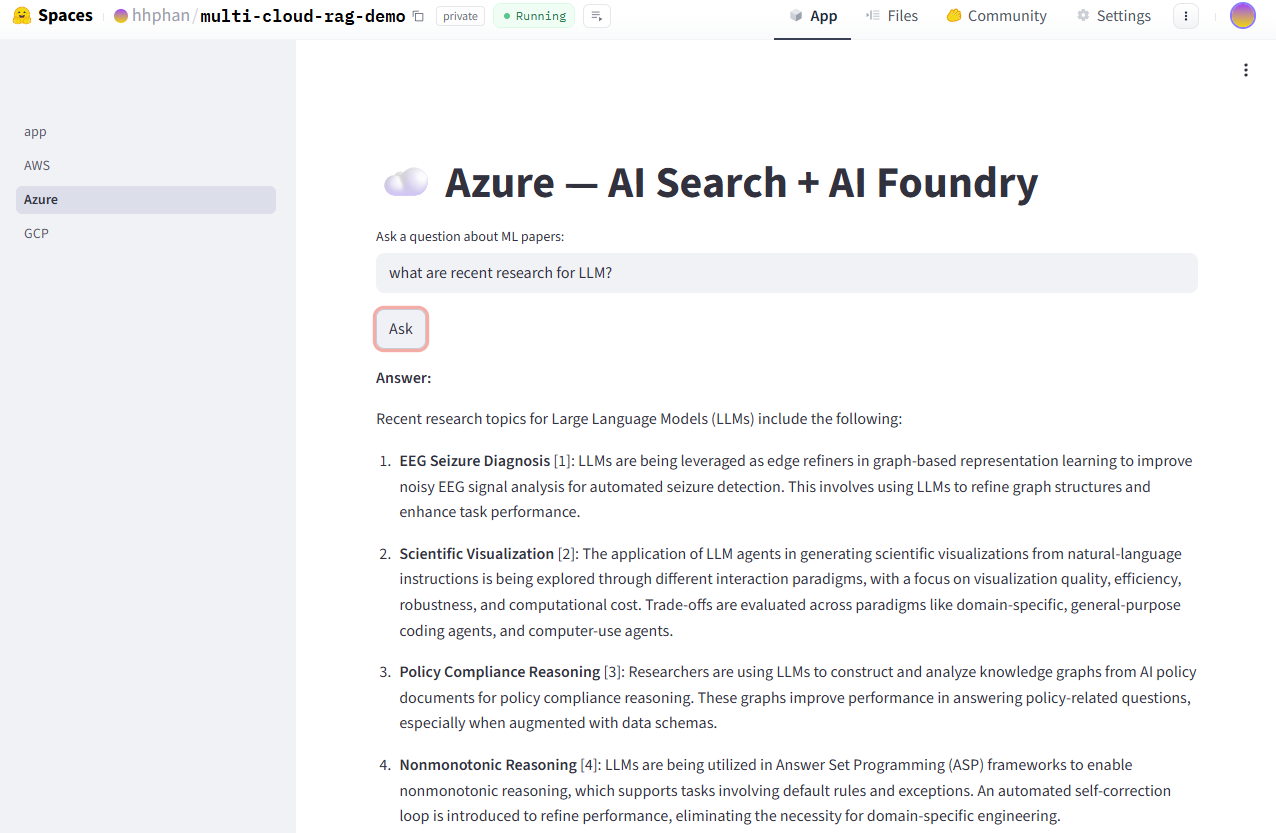 The Streamlit app running on Hugging Face Spaces — the same code that ran locally, now publicly accessible with all three cloud backends wired up.
Key Insights
1. The adapter pattern is the real deliverable.
The cloud-specific services are interesting, but the thing that makes this work is core/interfaces.py. Three abstract base classes define the contract; every cloud just fulfils it. The query handler is genuinely cloud-agnostic — it calls embedder.embed(), retriever.search(), and generator.generate(), and it doesn't care what's on the other side. Writing those interfaces correctly upfront is what makes the rest possible.
2. Each cloud has a canonical tool for long-running batch jobs. AWS has Glue Python Shell. Azure has Azure ML Scheduled Jobs. GCP has Vertex AI Custom Training. All three scale to zero between runs, accept plain Python scripts, and are triggered by a scheduler. The Dataflow detour on GCP was instructive — the framework that looks most like Glue (distributed ETL) was the wrong choice for a sequential workload. Match the tool to the job shape, not the marketing category.
3. Embedding vectors are not cross-cloud portable.
Titan V2 produces 1024-dimensional vectors. text-embedding-3-large produces 3072. text-embedding-004 produces 768. You cannot query an OpenSearch index with a Vertex AI embedding — the dimensions don't match and the models have different embedding spaces entirely. Each cloud's vector store is isolated. This is a natural consequence of the design principle, but worth stating explicitly.
4. Serverless does not mean free — it means cost-proportional. AOSS charges per OCU-hour as long as your collection exists. Bedrock charges per token. AI Search has a ~$75/month floor regardless of usage. The economics only work if you size correctly: Glue at 0.0625 DPU (the minimum), Azure ML cluster at min=0 nodes, Firestore's per-op billing. Leaving any of these at a larger configuration than necessary costs real money for a project that sits idle most of the day.
5. Terraform is what makes this reproducible.
One terraform apply provisions all services, IAM roles, scheduler triggers, and outputs the API endpoint and key. Tearing it down is terraform destroy. The entire cloud environment is version-controlled, diffable, and shareable. Without Terraform, "deploy this on a fresh AWS account" would mean a multi-page manual of console clicks. With it, it's a single command.
6. Cloud-neutrality requires active enforcement.
Nothing technically prevents you from importing boto3 inside core/chunker.py. The only thing keeping core/ truly cloud-agnostic is the discipline of never doing it. In a team setting, a CI lint check that scans core/ for cloud SDK imports would enforce this automatically. It's the kind of boundary that looks obvious until someone violates it on a deadline.
7. This is a prototype — and the ingest strategy reflects that.
Each cloud's vector store currently holds 500–1,000 papers, loaded by a single daily job that fetches the top-N results by arXiv relevance ranking. One difference from the local RAG pipeline: this cloud version limits ingest to abstracts and metadata only — full paper text would require downloading and parsing each PDF separately, which is out of scope for this prototype. That is enough for a meaningful demo but not a comprehensive knowledge base. In a production scenario, the right approach is a two-phase ingest strategy: run a full historical load first (Glue, Azure ML Job, or Vertex AI Custom Training with MAX_RESULTS raised to cover all available papers in the target categories), then switch to a daily incremental job that fetches only papers submitted the previous day using a date-windowed query. This gives you a comprehensive index from day one and keeps it current automatically — without re-indexing papers that are already stored, since all three stacks use deterministic document IDs that make every upsert idempotent.
The full project is open source on GitHub at github.com/hhphan/multi-cloud-serverless-rags, including all Terraform modules, adapter implementations, ingest jobs, and deployment scripts for all three clouds. The Streamlit UI is deployed on Hugging Face Spaces with one page per cloud, each with its own session state pointing at its own live API endpoint — you can switch between AWS, Azure, and GCP and ask the same question on each page to compare how each cloud's AI stack responds.
If there's appetite for a Part 3, the most interesting directions are incremental arXiv ingest (date-windowed queries instead of top-N relevance), hybrid search (combining keyword and vector scores on Azure AI Search), and a proper cost comparison across the three stacks for the same daily query volume.